On this page
Making it Faster
Some Time Away
When I am doing something boring, cooking, watching the news, taking a walk, my mind drifts back to my chess problems. What can I do to make it work? Is there something I am missing? Can I even call myself a software developer if I can't solve this problem? Have I gotten too old to code? Do I need to search for all future moves for each level? Now that's an interesting idea.
Some problems need a time out. Sleep can help debug an issue, to dream up new ideas and methods, and allow you to think outside the box. Spending a little time away from the computer, away from the problem, does free up the mind to search for different possibilities and enable you to look at things from new angles. When frustration hits, walk away, take a break, and hopefully inspiration will motivate you to try a new solution and a fresh approach. Maybe a cup of tea will do the job?
I have come up with two ideas to help improve the computer player's performance. The first is to optimize the future move checking. After a certain level I don't see the point of exploring each possible move, only those that are the best. This should drastically reduce the number of nodes created and allow the number of levels to look at (moves ahead) to be increased. The second idea is to add an extra board rating process. Each empty square can be seen by different pieces (covered by), and I want that to count to the overall rating.
Hopefully after these ideas have been implemented the computer player will be able to compete against a human. After all, that is the whole point of this chess library. If it doesn't, then I may be tempted to change careers and become a writer instead (and no one wants that).
Optimize
Finding the next best move involves the creation of a branch of all possible future moves and then calculating each board's rating value. This can grow very quickly, into half a million moves when looking 4 moves ahead, which takes too long to process. Instead, I want to stop looking at all future moves, but only those that are the best.
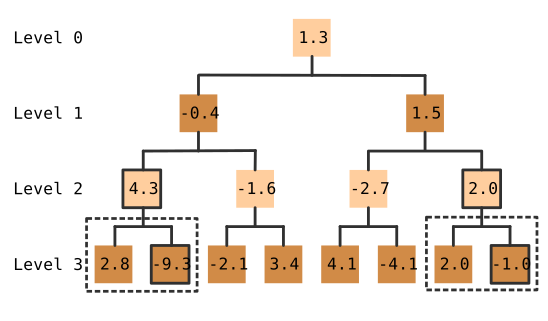
Here is an example of what will happen. The game starts with the white player (level 0), and two possible moves are found (level 1). After this, all these possible moves each have their following moves checked (level 2). Now at this point a change is made, a new approach is being used. Instead of searching for all possible moves, it only picks the best node, which in this case is the node with the value of 4.3 (for the white player). The other node (-1.6) is not going to be looked at any move, because this seems like a bad move to make and is unlikely to have been made, so there is no point searching down its path.
The same will be done for the next following move (level 3) where it will only select the best move, which is -9.3 for the black player. There is the possibility that the move I am no longer looking at has a checkmate path behind it and would end up being the better move if it had continued down it. I will lose some precision in favor of speed, but hopefully the end result will justify it.
There is something else I need to take into account. After a move has been made, the root branch is reset, so that it can keep any existing nodes that were found before. But now I am not including all the child nodes, only keeping the best possible move, therefore some nodes will be missing children. I will need to keep an eye out for this and refill those nodes that have been optimized, so that they contain all their child nodes (and not just the best one).
In the computer player config class, I have added a new optimize level property. This is just like the other properties, with its own getter and setter functions, plus it is part of the cloning function. The default value is 2, which means that at this level every future move will be optimized.
The next parts need to be done for the non-web computer player and the web version. In the "computer-player.js" file, when it is processing a node, it gets a list of moves that the player can next make and converts this into a list of nodes. After it has done this, I have added some extra optimization checks, the first of which is to see if the current level is below the computer player's configuration optimize level setting and if it is then the whole list of nodes is added to the branch, just as it had been doing before.
If the current level is at the point where extra optimization needs to be performed then I look for the best node from the list, and add that to the branch, all on its own, without any of the other nodes (these will therefore not be processed or looked at).
In the "node-worker.js" file the same changes are added, but instead of adding the best node to the branch directly, I post the result back to the branch worker.
The next change is done within the "branch.js" file, where it resets the root node.
Here I have added the _removeOptimizedNodes function just before I add all the nodes to the list.
I have made some assumptions here. If a node only contains one child node, then it must have been optimized and therefore it needs to be reprocessed, so that all possible moves are recalculated. In the process of doing this I reset the node's node list to a blank list, which required me to give the node's node list property a setter function (I didn't think it was needed at the time I created it). This function will remove all the node lists that only contain just one node, forcing their parent node to recalculate all possible moves.
After some testing I found yet another bug.
It seems that I was processing nodes that contained boards with games that had already finished (in checkmate or stalemate) and
was therefore looking for their next move.
To stop this from happening, inside the next function, I have added some additional checks to see if the game has finished or not.
After even more testing I found an issue with the game hitting stalemate in a different way. Before, I was seeing if the board contained only 2 kings and no other pieces. But it looks like there are other ways to get into a stalemate situation.
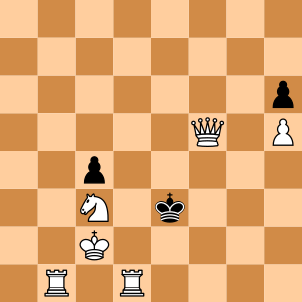
Here the black player cannot move any piece. Both pawns are stuck and all the places the king can move to are invalid, as it would leave it in check. The best way to handle this is to check the list of moves that the player can make and if they are all invalid then the game has finished in a stalemate. But where should this take place?
This needs to be done in both the non-web and web places where it gets and processes the list of possible moves. After each list of moves is processed into a list of nodes, removing the invalid moves, I can then check how many nodes there are. If the list is empty, then it must be a stalemate.
This is inside the "computer-player.js" file. After creating the list of nodes, I check how many there are. If there are none then I can tell the branch class that the parent node has ended in stalemate.
For the web parts there are two locations that need changing.
The first is in the "node-worker.js" file, inside the messageEvent function, where after creating the node list I again check if the list is empty.
If there are nodes in the list, then I post an empty list of nodes back to the branch worker.
In the "branch-worker.js" file, within the result message function, I check the number of returned nodes that were sent back from the node worker. If the list is empty, then it must be a stalemate. I then tell the branch that the parent node has ended in stalemate.
In the web and non-web versions they both end up calling the branch class's setStalemate function.
This is used to put the parent node's board into the stalemate state and to make sure the node is no longer processed.
Extra Board Rating
I had an idea to add an extra method to the board calculation process. A board is given a score, a rating value, to show which player has the upper hand. This is used by the computer player when it is trying to work out which is the best move to make. There are a number of different computer player configurations available, each one can be adjusted to alter how the board's rating value is calculated and therefore affect how the computer plays the game.
My new idea is to do with all the empty squares on the board and how many pieces can see it. If more white pieces can see the square than black ones, then it is given a value in the positive range. If there are more black than white, then the value will be in the negative range. The more white pieces than black then the larger the value. Add up all the values for all the empty squares and you end up with a total value, which is then added to the overall rating of the board. It doesn't matter if a queen or a pawn can see the square, only whether it can or cannot, they are treated the same.
Most of the time the white pieces will be basically the same as the black ones and will cancel each other out. But there will be a subtle difference that could indicate which player has a stronger strategic position. The more empty squares the white player has covered the less options the black player has.
I have added a new cover coefficient property to the computer player config class. I am not really sure what its default should be, but I didn't want it to have too big an effect on the overall board rating, so I have set it to 0.5.
The board rating class has the calculate function that performs all the parts required to come up with a single rating value.
I have added a call to the cover calculation function which returns a value that is used with all the other parts to work out the final rating value.
This additional cover setting slots into the overall calculation very well.
The cover calculation function is very similar to the other attack and defence functions. I go through all squares on the board, only looking at the ones that are empty, and then get a count of the number of pieces that are attacking it, that is, those that could have captured a piece if it had been located there. This is done for both the white and black players. The cover value for the square is then calculated by subtracting one from the other. This cover value will be added to the overall total, which is returned after all the squares have been processed.
I put the cover coefficient through a number of games to analyse what effect it has on a computer versus computer game. It doesn't look like it makes a big difference, it may even make it worse if you rely on it in any way.